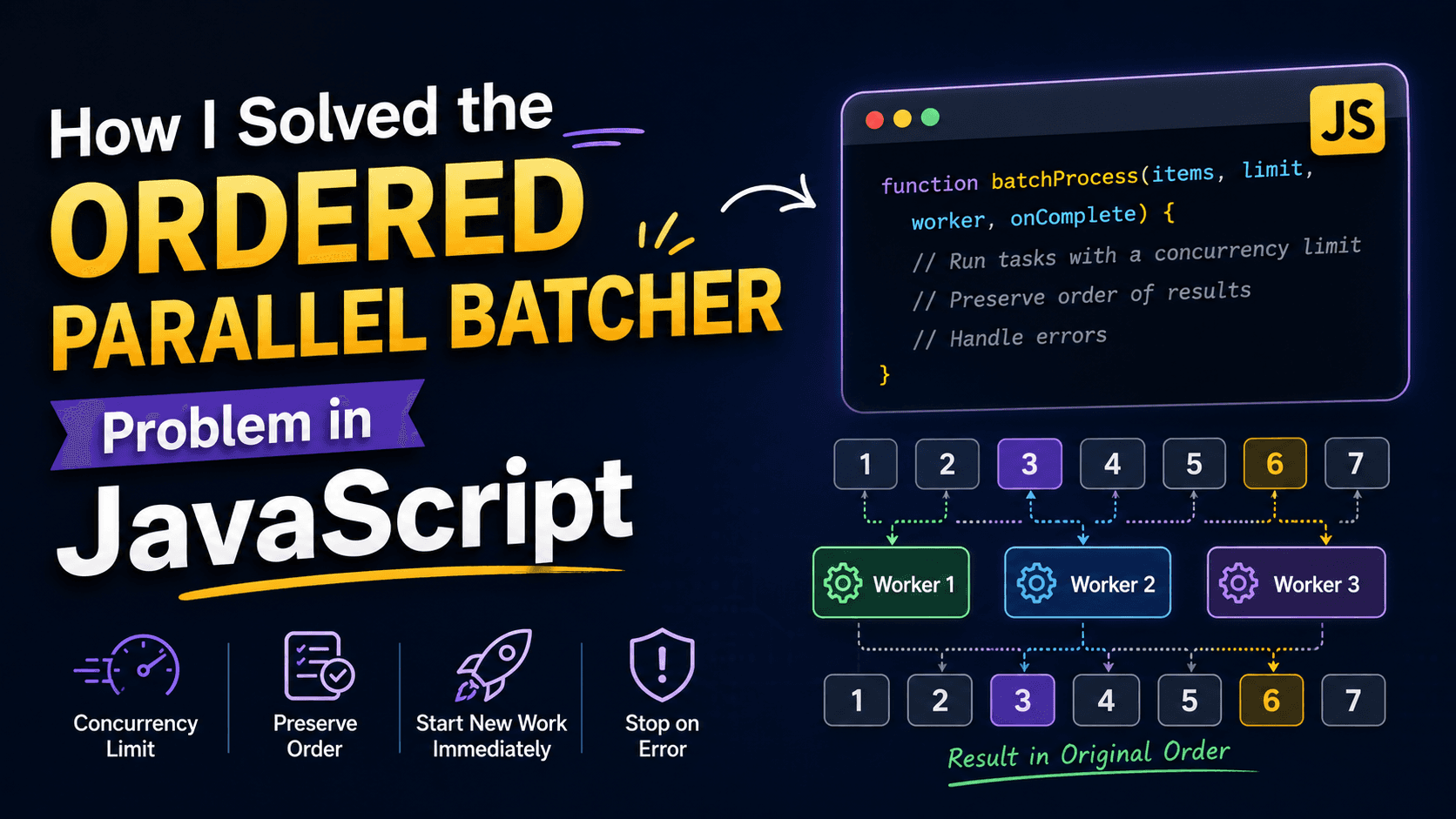
How I Solved the Ordered Parallel Batcher Problem in JavaScript
I'm Shubham (@shubhamsinghbundela), I'm a Software Engineer, a Full-stack developer, a tech enthusiast, and a technical writer here on @Hashnode. I have a strong zeal to share my acquired knowledge and I am also willing to learn from others.
Every coding problem teaches you something new. Recently, I worked on an interesting asynchronous JavaScript interview question called Ordered Parallel Batcher. At first, I thought the solution would be straightforward, but I quickly realized that managing concurrency while preserving the order of results is more challenging than it looks.
In this blog, I'll share the problem, my initial approach, the mistakes I made, and the final solution that helped me understand asynchronous programming much better.
The Problem
The challenge was to implement a function with the following requirements:
Process multiple tasks in parallel.
Never run more than a fixed number of workers at the same time.
Start a new task immediately when one finishes.
Preserve the original order of the results.
Stop execution and return an error if any task fails.
This is a common real-world scenario. Imagine downloading multiple files, processing images, or making API requests. Running everything simultaneously can overload your system, while running one at a time is inefficient. A concurrency limit gives the best balance.
My First Approach
Initially, I tried solving the problem using a queue.
The idea seemed correct:
Fill the queue with the first
limittasks.Remove a task from the queue.
Execute it.
Push another task into the queue.
Repeat until everything was processed.
However, there was one big issue.
I used a while (queue.length > 0) loop.
The problem is that worker() is asynchronous. JavaScript doesn't wait for asynchronous callbacks before continuing the loop. As a result, the queue became empty immediately, and almost every task started without respecting the concurrency limit.
Although the logic looked reasonable on paper, it didn't work correctly because asynchronous code behaves differently from synchronous loops.
That was an important lesson.
First Approach Wrong Code:
function batchProcess(items, limit, worker, onComplete) {
  const queue = [];
  const result = [];
  let index = 0;
  let completed = 1;
  while (index < limit) {
    queue[index] = { idx: index, time: items[index] };
    index += 1;
  }
  while (queue.length > 0) {
    const { idx, time } = queue.shift();
    worker(time, (err, data) => {
      result[idx] = data;
      if (completed === items.length) {
        if (err) {
          onComplete(err);
        } else {
          onComplete(null, result);
        }
      }
      completed += 1;
    });
    if (index < items.length) {
      queue.push({ idx: index, time: items[index] });
      index += 1;
    }
  }
}
module.exports = batchProcess;
Understanding the Correct Approach
Instead of relying on a loop, I realized that every completed task should be responsible for starting the next one.
The execution flow becomes:
Start at most
limitworkers.When any worker finishes:
Save its result.
Decrease the active worker count.
Increase the completed count.
Start the next pending task immediately.
Continue until every task has completed.
This guarantees that there are never more than limit workers running simultaneously.
My Final Solution
function batchProcess(items, limit, worker, onComplete) {
  let result = [];
  let index = 0;
  let active = 0;
  let completed = 0;

  function next() {
    if (completed === items.length) {
      return onComplete(null, result);
    }

    while (active < limit && index < items.length) {
      let currentIndex = index;
      active++;
      index++;

      worker(items[currentIndex], (err, data) => {
        if (err) return onComplete(err);

        result[currentIndex] = data;
        active--;
        completed++;

        next();
      });
    }
  }

  next();
}

module.exports = batchProcess;
Why This Works
The solution maintains four important variables:
index
Tracks the next task that hasn't started yet.
active
Tracks how many workers are currently running.
This ensures we never exceed the concurrency limit.
completed
Tracks how many tasks have finished successfully.
Once this equals the total number of items, we return the final result.
result
Stores results using the original index.
result[currentIndex] = data;
Even if tasks finish in a different order, the final array preserves the original input order.
Example
Suppose we have:
items = [1,2,3,4,5]
limit = 2
Initially:
Worker A -> 1
Worker B -> 2
If Worker B finishes first:
Worker A -> 1
Worker B -> 3
If Worker A finishes:
Worker A -> 4
Worker B -> 3
If Worker B finishes again:
Worker A -> 4
Worker B -> 5
At every moment, only two workers are active.
That's exactly what the problem requires.
Final Thoughts
This problem looked simple at first, but it taught me one of the most valuable lessons in asynchronous JavaScript: controlling concurrency is very different from writing synchronous loops.
If you're preparing for JavaScript or Node.js interviews, I highly recommend practicing problems like this. They strengthen your understanding of asynchronous programming and mirror real-world scenarios you'll encounter when building scalable applications.
Happy coding!